Platform Configuration
"Platform Configuration" is designed for platform administrators to maintain platform global parameters, third-party login, OAuth applications, application plugins, password security policies, and navigation menu ordering.
Entry path: Left sidebar menu Platform Management > Platform Configuration, page route
/admin/global/manage.
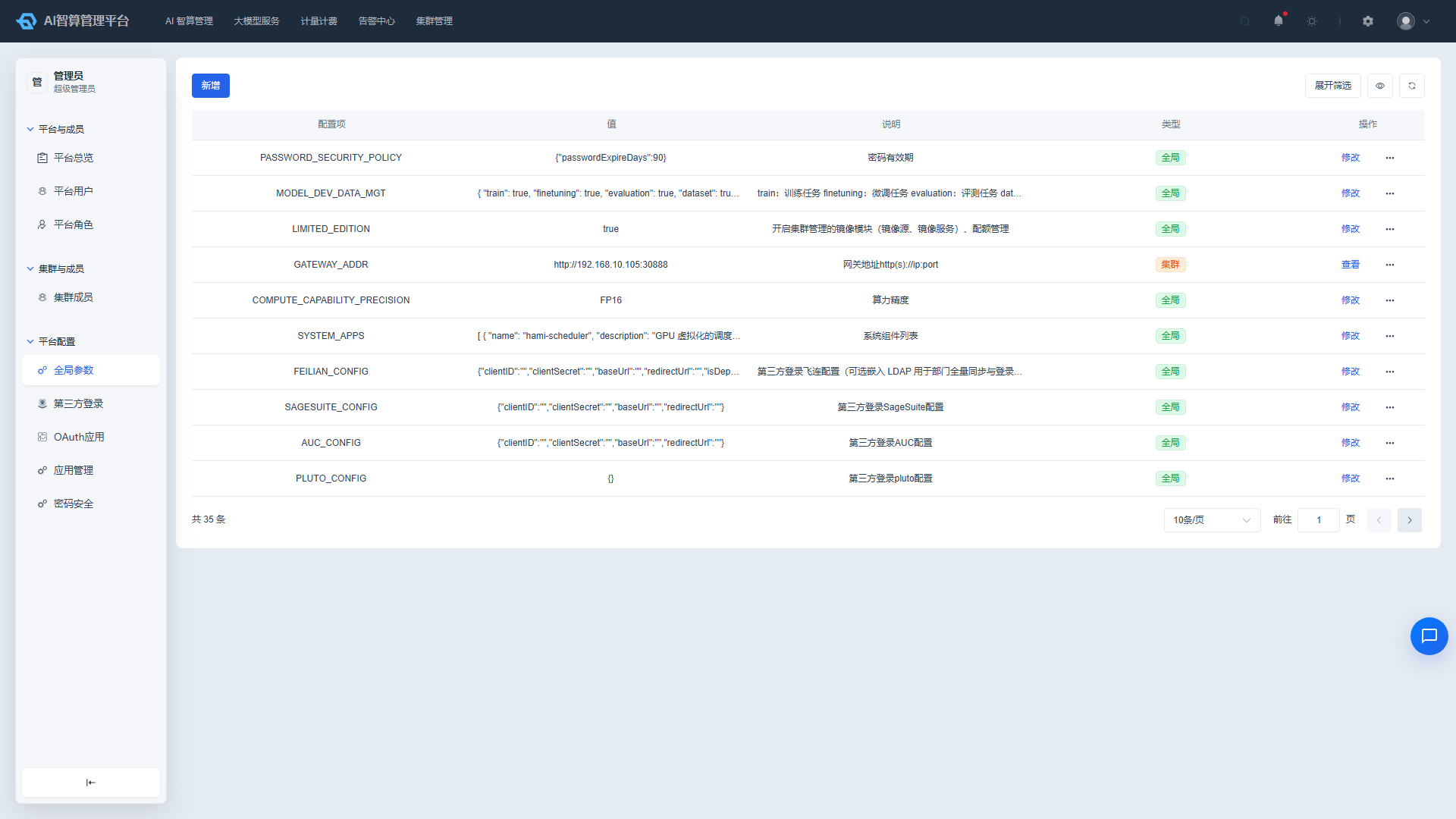
Page Menu
| Page | Route | Description |
|---|---|---|
| Global Parameters | /admin/global/config-map | Platform global/cluster two-level parameters |
| Cluster Parameters | /admin/global/config-map/:key/clusters | Per-cluster parameter overrides |
| Third-party Login | /admin/global/oauth | OAuth/OpenID/LDAP and other login integrations |
| OAuth Applications | /admin/global/client-oauth | Platform as an OAuth provider |
| Application Management | /admin/global/application-management | Plugin-based application install/uninstall |
| Password Security | /admin/global/password-security | Password expiration and login protection |
| Navigation Order | /admin/global/navigation-order | Navigation menu ordering |
Global Parameters
Global parameters control platform branding, authentication methods, resource scheduling, feature toggles, and other behaviors. Parameters support two scopes: global or per-cluster override. The following table lists the commonly used parameters actually in use with detailed descriptions.
Common Global Parameter Reference
The table below lists only keys that operators can configure on the Global Parameters page and that the platform actually reads (config-map). The "Version" column shows in which major version the key is available; the "Preset" column shows whether AUC writes it automatically during first initialization — Preset needs no manual addition, while Not preset must be added on the Global Parameters page before it takes effect.
Settings that are only injected via environment variables / K8s Secrets, or used only by development builds (e.g. payment private keys,
WEB_DEV_ALLOWED_HOSTS), are not listed below.
1. Platform Basics and Branding
| Parameter Key | Version | Preset | Default/Example | Description |
|---|---|---|---|---|
TITLE | 2.2 / 2.3 | Preset | AI算力池化管理 | Product name displayed in the browser tab title and the top-left corner of the page. Supports a per-language object form. |
LOGO | 2.2 / 2.3 | Preset | Empty | Logo image URL/SVG for the top-left corner; the default logo is used when left empty. |
FAVICON | 2.2 / 2.3 | Preset | SVG icon | Browser tab favicon; supports SVG strings. |
HOME_PAGE | 2.2 / 2.3 | Preset | JSON configured by role | Home page address navigated to when clicking the top logo; varies by role (e.g. super_admin, ai_admin, cluster_admin, billing_admin). |
CUSTOM_THEME_ENABLED | 2.2 / 2.3 | Preset | true | true/false, whether to allow theme color switching in theme settings. |
TERMINOLOGY | 2.2 / 2.3 | Preset | {"workspace":"工作空间","project":"项目"} | Custom display text for terms such as "Workspace" and "Project". |
DEFAULT_UI_CONFIG | 2.3 | Not preset | {"theme":"classic","layout":"classic","listHeaderEnabled":true} | Default theme, layout, and whether the list header is enabled; invalid or missing values fall back to built-in defaults. |
AI_CHAT_ENABLED | 2.2 / 2.3 | Preset | true | true/false, whether to enable the AI assistant entry in the bottom-right corner. |
REPORT_DOMAIN | 2.2 / 2.3 | Not preset | Empty | Access domain of the operations reporting service (e.g. Grafana), used to embed reports in pages such as Alarm Statistics. |
2. Security and Authentication
| Parameter Key | Version | Preset | Default/Example | Description |
|---|---|---|---|---|
JWT_EXPRIE_TIME | 2.2 / 2.3 | Preset | 86400 | JWT token expiration time in seconds (default: 1 day). |
LOGIN_NEED_2FA | 2.2 / 2.3 | Preset | false | true/false, whether to enforce two-factor authentication at login. |
TWO_FA_EXPRIE_TIME | 2.2 / 2.3 | Preset | 1800 | Two-factor authentication session expiration time in seconds (default: 30 minutes). |
TWO_FA_ENABLE_LIST | 2.2 (deprecated in 2.3) | Preset (2.2 only) | JSON array | Two-factor authentication method configuration (SMS, email, MFA) used up to 2.2. Since 2.3 it has been split into SMS_PROVIDER, SMTP_SERVER, and MFA; this key is only kept for upgrade migration. |
MFA | 2.3 | Preset | {"enabled":false} | MFA (TOTP) two-factor authentication toggle and configuration. |
PASSWORD_SECURITY_POLICY | 2.2 / 2.3 | Not preset | JSON configuration | Password strength/expiration policy for local accounts, corresponding to the Password Security page. |
SSO_ENABLED | 2.2 / 2.3 | Preset | false | true/false, whether to enable third-party single sign-on. |
REAL_NAME_VERIFY_REQUIRED | 2.3 | Preset | false | true/false, whether real-name verification is required before creating resources (true enables it). |
3. SMS and Email Channels
| Parameter Key | Version | Preset | Default/Example | Description |
|---|---|---|---|---|
SMS_PROVIDER | 2.3 | Preset | {"enabled":false,"provider":"noop"} | SMS provider configuration (contains cloud AK/SK and is sensitive; never sent to the browser). Used for login, registration, and password-reset verification codes. |
SMTP_SERVER | 2.3 | Preset | {"enabled":false,"email":"","password":"","smtp":{"server":"","port":465,"ssl":true}} | Email (SMTP) configuration (contains an email password and is sensitive). Used for email verification codes and notifications. |
4. Login Page and User Registration
| Parameter Key | Version | Preset | Default/Example | Description |
|---|---|---|---|---|
LOGIN_HERO | 2.3 | Preset | JSON configured by language | Login page branding: supportContact, copyright, image, and the title/intro/image for the console/admin platform sections; empty fields fall back to built-in defaults. |
LOGIN_ENTRIES | 2.3 | Preset | {"register":false,"smsRegister":false,"smsReset":false,"qr":false} | Login page entry toggles: register self-registration, smsRegister mobile registration, smsReset mobile password reset, qr WeChat QR login. All are off by default in production and must be enabled explicitly. |
USER_DEFAULT_WORKSPACE | 2.3 | Preset | gen-studio | Workspace where the same-named project is created when initializing a new user; a missing value makes user initialization fail. |
USER_DEFAULT_CLUSTERS | 2.3 | Preset | ["host"] | List of cluster names (JSON array) a new user joins by default. |
DEFAULT_PAID_MODE | 2.3 | Preset | prepaid | Default billing mode for new users: prepaid or postpaid. |
REGISTER_DEFAULT_DEPT | 2.3 | Preset | {"deptIDs":[],"roleIDs":[]} | Default department and roles for self-registered users; when empty, the root department and platform member role are used. |
REGISTER_DEFAULT_PROJECT_QUOTA | 2.3 | Not preset | {"vcpus":100,"ram":1024000} | Default project quota for self-registered users; ram is in MiB; 0/0 means unlimited. |
REGISTER_CODE_VERIFICATION | 2.3 | Preset | {"email":true,"sms":true} | Registration verification-code toggle; only an explicit false disables the corresponding channel. |
REGISTRATION_LIMIT | 2.3 | Not preset | JSON configuration | Rate limits for registration/password-reset verification codes (resend interval, hourly/daily caps, per-IP caps, etc.). |
5. Third-party Login
| Parameter Key | Version | Preset | Default/Example | Description |
|---|---|---|---|---|
ENABLE_SOURCE | 2.2 / 2.3 | Preset | [] | List of enabled third-party login methods, e.g. ldap, dingtalk, feishu, wechat, oidc. |
LDAP_CONFIG | 2.2 / 2.3 | Preset | JSON configuration | LDAP server address, bind DN/password, base DN, field mappings, etc. |
DINGTALK_CONFIG | 2.2 / 2.3 | Preset | JSON configuration | DingTalk AppKey, AppSecret, callback URL, whether to sync departments. |
FEISHU_CONFIG | 2.2 / 2.3 | Preset | JSON configuration | Feishu AppID, AppSecret, callback URL, whether to sync departments. |
WECHAT_CONFIG | 2.3 | Preset | JSON configuration | WeChat Open Platform website app (QR login) AppID, AppSecret, callback URL (sensitive). |
PLUTO_CONFIG | 2.2 / 2.3 | Preset | {} | Pluto login configuration. |
AUC_CONFIG | 2.2 / 2.3 | Preset | JSON configuration | AUC OAuth login ClientID, ClientSecret, BaseUrl, callback URL. |
SAGESUITE_CONFIG | 2.2 / 2.3 | Preset | JSON configuration | SageSuite login configuration. |
FEILIAN_CONFIG | 2.2 / 2.3 | Preset | JSON configuration | Feilian login configuration. |
OIDC_CONFIG | 2.2 / 2.3 | Preset | JSON configuration | Standard OpenID Connect login configuration: issuer, clientID/clientSecret, redirectUrl, scopes, and claimMapping. |
For detailed configuration steps for third-party login, see the "Third-party Login" section of this document.
6. Resources and Scheduling
| Parameter Key | Version | Preset | Default/Example | Description |
|---|---|---|---|---|
QOS | 2.2 / 2.3 | Preset | Guaranteed | Pod QoS strategy, Guaranteed or Burstable, affecting resource guarantees and eviction priority. |
PRIORITY_CONFIG | 2.2 / 2.3 | Preset | JSON configuration | Task priority global toggle, priority keyword mapping, default priority for each resource type. |
INSTANCE_REQ_LIMIT_FACTOR | 2.2 / 2.3 | Not preset | 1 | Oversubscription factor of container-instance CPU/memory limits relative to requests (positive integer). 1 means limits = requests; a value greater than 1 allows oversubscription; a missing or invalid value is treated as 1. |
RECYCLE_EXP_DAY | 2.2 / 2.3 | Preset | 20d | Recycle bin automatic cleanup period, e.g. 20d means permanent deletion after 20 days. |
LIMITED_EDITION | 2.2 / 2.3 | Preset | false | true/false, whether to enable the image module (image source, image service) and quota management in cluster management. |
CLUSTER_MGMT | 2.2 / 2.3 | Not preset | false | true/false, whether to enable the cluster management module. When enabled, admins can view nodes, GPUs, storage, and other resources under Cluster Management. |
MODEL_DEV_DATA_MGT | 2.2 / 2.3 | Preset | JSON configuration | Controls the display/permission toggles for each module in model development and data management, including training, fine-tuning, evaluation, datasets, data cleaning, augmentation, and online augmentation. |
RESOURCE_PRICE_PREVIEW | 2.3 | Preset | true | Billing master switch. An explicit false disables all price previews, pre-charges, and balance checks; when missing or unreadable it defaults to enabled. |
7. Storage, Network, and Access Addresses
| Parameter Key | Version | Preset | Default/Example | Description |
|---|---|---|---|---|
STP_PORT | 2.2 / 2.3 | Preset | 30884 | SFTP service port, used when users upload/download large files via SFTP. |
STP_SERVE | 2.2 / 2.3 | Preset | Empty | SFTP service address or additional configuration, typically used in conjunction with STP_PORT. |
IDE_DOMAIN | 2.2 / 2.3 | Preset | Empty | Unified access domain prefix for online IDEs such as Jupyter / VS Code. |
GATEWAY_ADDR | 2.2 / 2.3 | Preset | Empty | Model gateway access address in the format http(s)://ip:port. |
MULTI_CLUSTER_URI_PREFIX | 2.2 / 2.3 | Not preset | /camp-manager | URI prefix configuration in multi-cluster mode, used to differentiate access paths for different clusters. |
SSH_SERVER | 2.3 | Preset | Empty | Public host used in container-instance SSH commands (single value: hostname or IP only, without scheme or port). When empty, the node's internal IP is used. For multi-cluster deployments, set it as a cluster parameter so each cluster uses its own public entry. |
8. Large Model Service
| Parameter Key | Version | Preset | Default/Example | Description |
|---|---|---|---|---|
API_GATEWAY_ENABLED | 2.2 / 2.3 | Preset | true | true/false, whether to allow access to large model services via API keys. |
COMPUTE_CAPABILITY_PRECISION | 2.2 / 2.3 | Preset | FP16 | Compute precision identifier, e.g. FP16, FP32, affecting model performance display and scheduling. |
AI_PROVIDER_MANUFACTURERS | 2.2 / 2.3 | Not preset | JSON array | Candidates for the AI gateway "provider" dropdown (whole-table replace), overriding the built-in manufacturer catalog. |
SERVICE_API_PATH_RULES | 2.2 / 2.3 | Not preset | JSON configuration | API path inference rules for model services: dedicatedImageModels, dedicatedVideoModels, ttsModels, asrModels, used to match dedicated endpoints by model name. |
LLM_CALL_DETAIL | 2.2 / 2.3 | Not preset | JSON configuration | Toggles visibility of the input/output content in model call details, by role (user/admin) and field (input/output), for privacy/compliance scenarios. |
9. Billing, Wallet, and Contract
| Parameter Key | Version | Preset | Default/Example | Description |
|---|---|---|---|---|
WALLET_OFFLINE_TRANSFER | 2.3 | Preset | JSON configuration | Wallet offline transfer details: bankName, accountName, accountNo, swiftCode, contactEmail; all-empty fields are treated as not configured. |
WECHATPAY_CONFIG | 2.3 | Preset | JSON configuration | Non-secret configuration for wallet WeChat Pay (Native QR recharge): mchid, appid, merchantSerialNo, publicKeyId, publicKey, notifyUrl, refundNotifyUrl. The merchant API private key and APIv3 key are injected via environment variables. |
ALIPAY_CONFIG | 2.3 | Preset | JSON configuration | Wallet Alipay recharge configuration: mode, appId, alipayPublicKey, notifyUrl, returnOrigin, gateway. The app private key is injected via environment variables. |
INVOICE_MIN_AMOUNT | 2.3 | Not preset | 50 | Minimum invoice amount (CNY), a single unified threshold no longer split by medium/header type. |
CONTRACT_PARTY_B | 2.3 | Preset | JSON configuration | Contract signing Party B (platform) info: name, code, address, contact, phone, email; an empty name is treated as not configured and blocks contract initiation. |
10. System and Monitoring
| Parameter Key | Version | Preset | Default/Example | Description |
|---|---|---|---|---|
SYSTEM_APPS | 2.2 / 2.3 | Preset | JSON array | System component list, used for display in K8s Cluster Management > Other > System Components. |
HPA_METRICS | 2.2 / 2.3 | Preset | JSON array | Metrics list supported by inference service HPA, including CPU, memory, requests per second, GPU memory utilization, etc. |
LICENSE_EXPIRY_REMINDER | 2.2 / 2.3 | Preset | 30 | License expiration advance reminder in days, default 30 days. The system sends tiered reminders by remaining days (e.g., 30 days / 7 days / 3 days); non-expired licenses are shown separately on the license management page. |
Terms and Privacy Content
"Terms of Service" and "Privacy Policy" are content (HTML fragments) rather than behavioral parameters. They are also maintained on the Global Parameters page, but are delivered through a separate content channel and are not included in the bulk delivery alongside login.
| Parameter Key | Version | Preset | Default/Example | Description |
|---|---|---|---|---|
TERMS_OF_SERVICE | 2.3 | Not preset | Empty | Terms of Service body (HTML fragment); falls back to the built-in generic template when not configured. |
PRIVACY_POLICY | 2.3 | Not preset | Empty | Privacy Policy body (HTML fragment); falls back to the built-in generic template when not configured. |
View Parameters
- Navigate to Platform Management > Platform Configuration > Global Parameters.
- The list displays: configuration item, value, description, type (Global/Cluster tags).
- Use the top filter bar to search by keyword (fuzzy matching on configuration item, value, description) and type (Global/Cluster).
Add/Edit Global Parameter
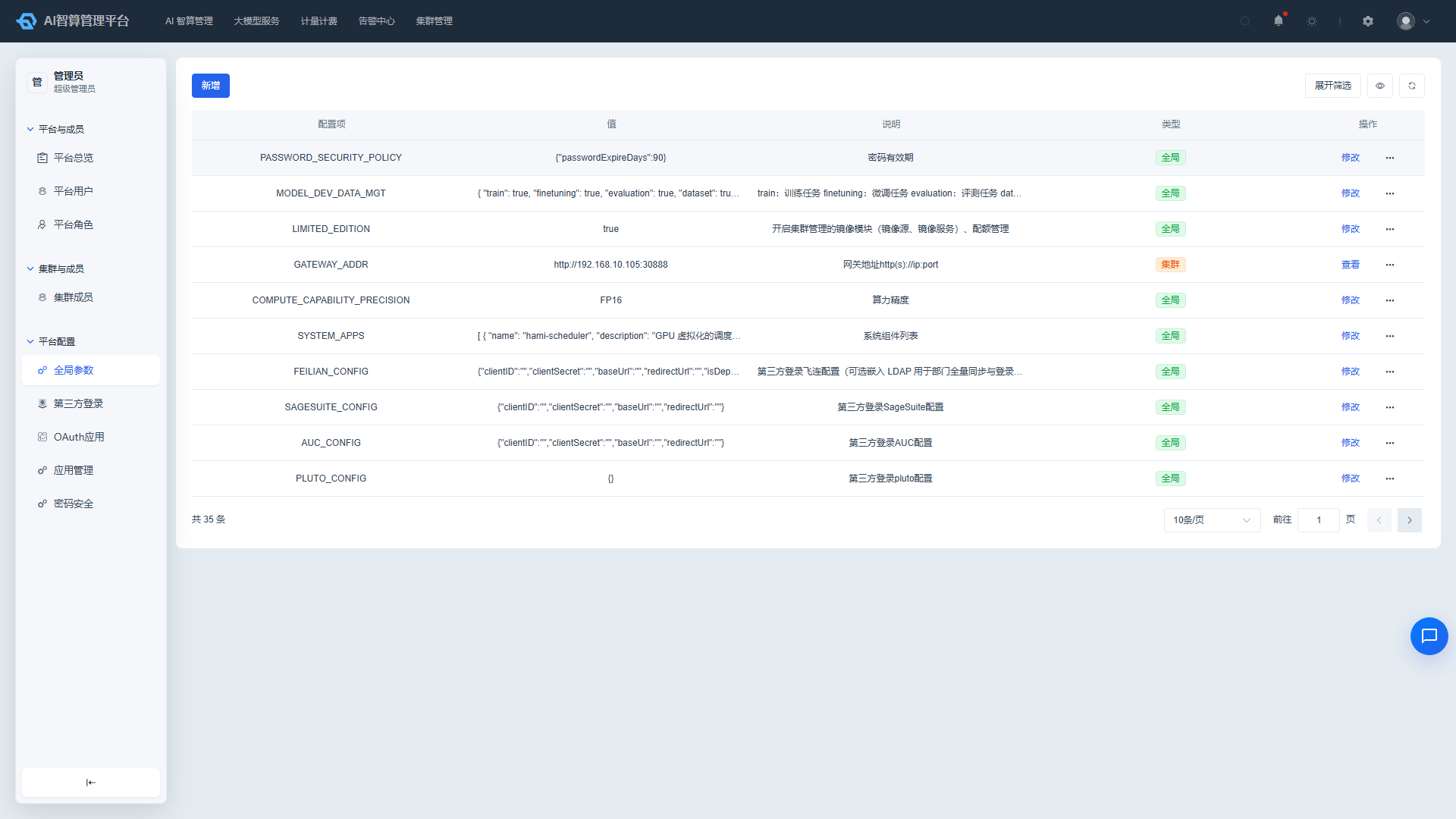
- Click "Add" or click "Edit" in a row.
- Fill in:
- Configuration Item: Parameter key name.
- Value: Parameter value.
- Description: Parameter usage description.
- Click "Save".
Switch Parameter Scope
- In the global parameters list, click "Convert to Cluster Parameter" or "Convert to Global Parameter" for a given parameter.
- The parameter type label will change accordingly after conversion; cluster-type parameters support per-cluster overrides.
Configure Cluster Parameter Values
- For cluster-type parameters, click "View Cluster Parameter Values".
- The page displays the parameter value list for each cluster; clusters without custom overrides are marked as "Default".
- Click "Edit" in a row to enter the override value for that cluster; offline clusters have the edit button disabled.
- Click "Save".
Third-party Login
Configure LDAP
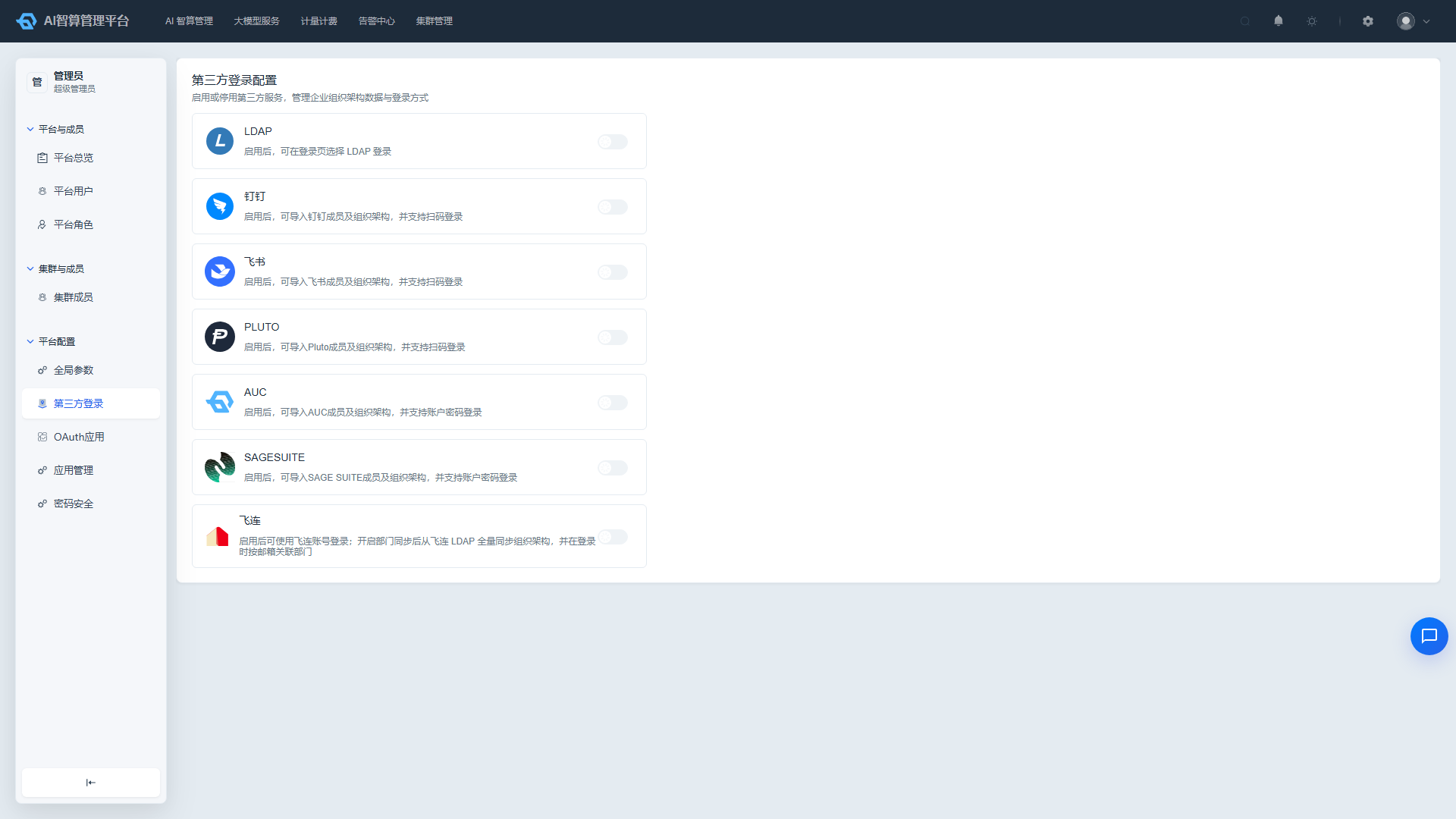
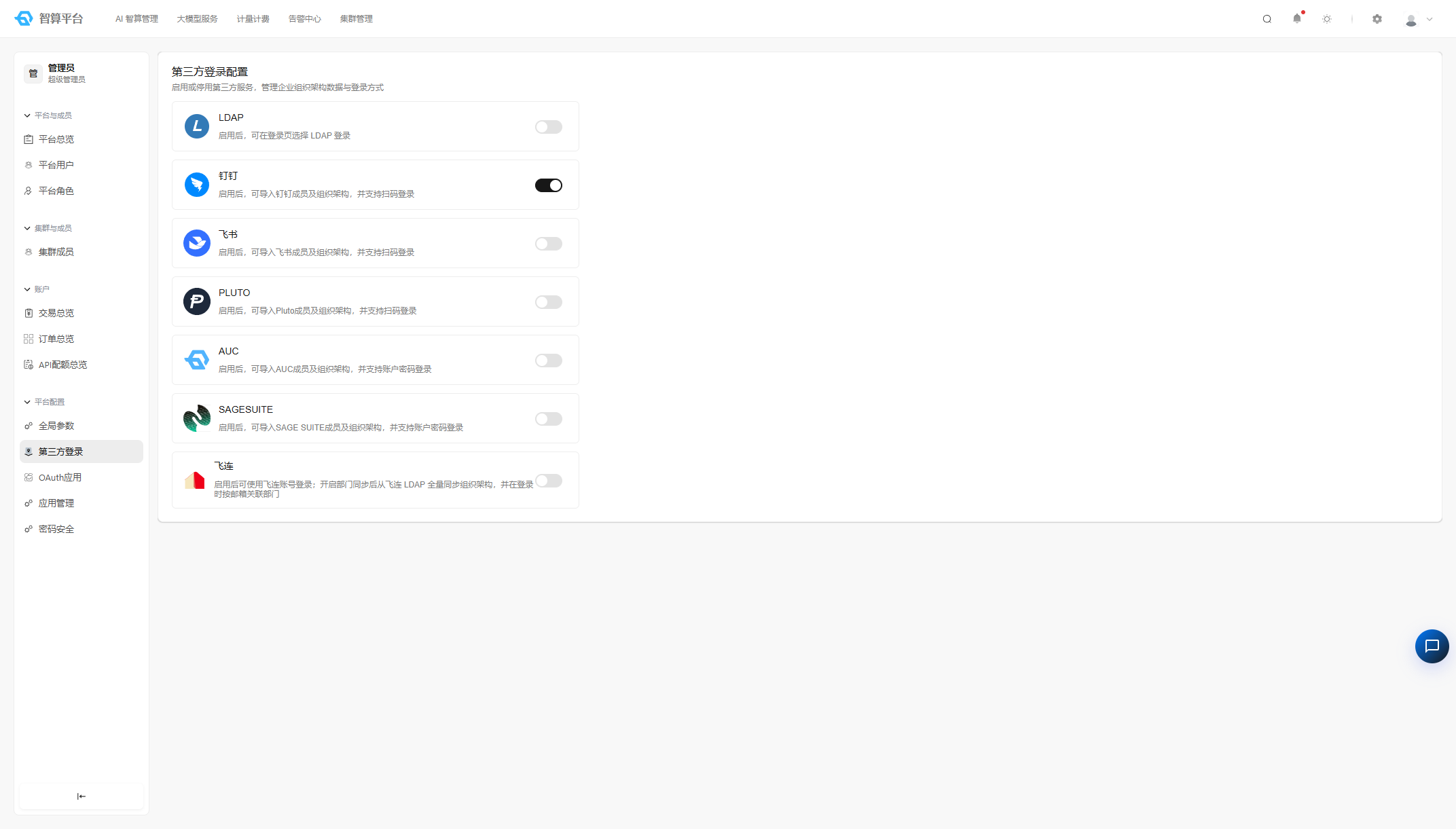
- Navigate to Platform Management > Platform Configuration > Third-party Login.
- Find the LDAP card and enable the toggle.
- Fill in:
- Address: LDAP server address.
- Bind DN: Administrator bind DN.
- Password: Bind password.
- Base DN: User search root DN.
- User Attribute Field Mappings: e.g. uid, mail, cn, etc.
- Click "Test" to verify the configuration; after the test passes, click "Save".
Configure DingTalk Login
- Find the DingTalk login card and enable the toggle.
- Fill in: AppKey, AppSecret, callback URL.
- To sync DingTalk department structure to the system, enable the "Sync Departments" option.
- Click "Test" to verify, then save.
Configure Feishu/Feilian/Pluto/AUC/SAGE SUITE Login
- Find the corresponding login card and enable the toggle.
- Fill in: Client ID / App ID, Client Secret / App Secret, Base URL, callback URL, etc. (fields vary slightly by protocol).
- Feilian also requires LDAP address, bind DN, password, and department base DN configuration.
- To sync department structure, enable the "Sync Departments" option.
- Click "Test" to verify, then save.
Configure OIDC Login
OIDC (OpenID Connect) login allows integration with any OIDC-compliant identity provider (e.g., Okta, Auth0, Azure AD, Keycloak).
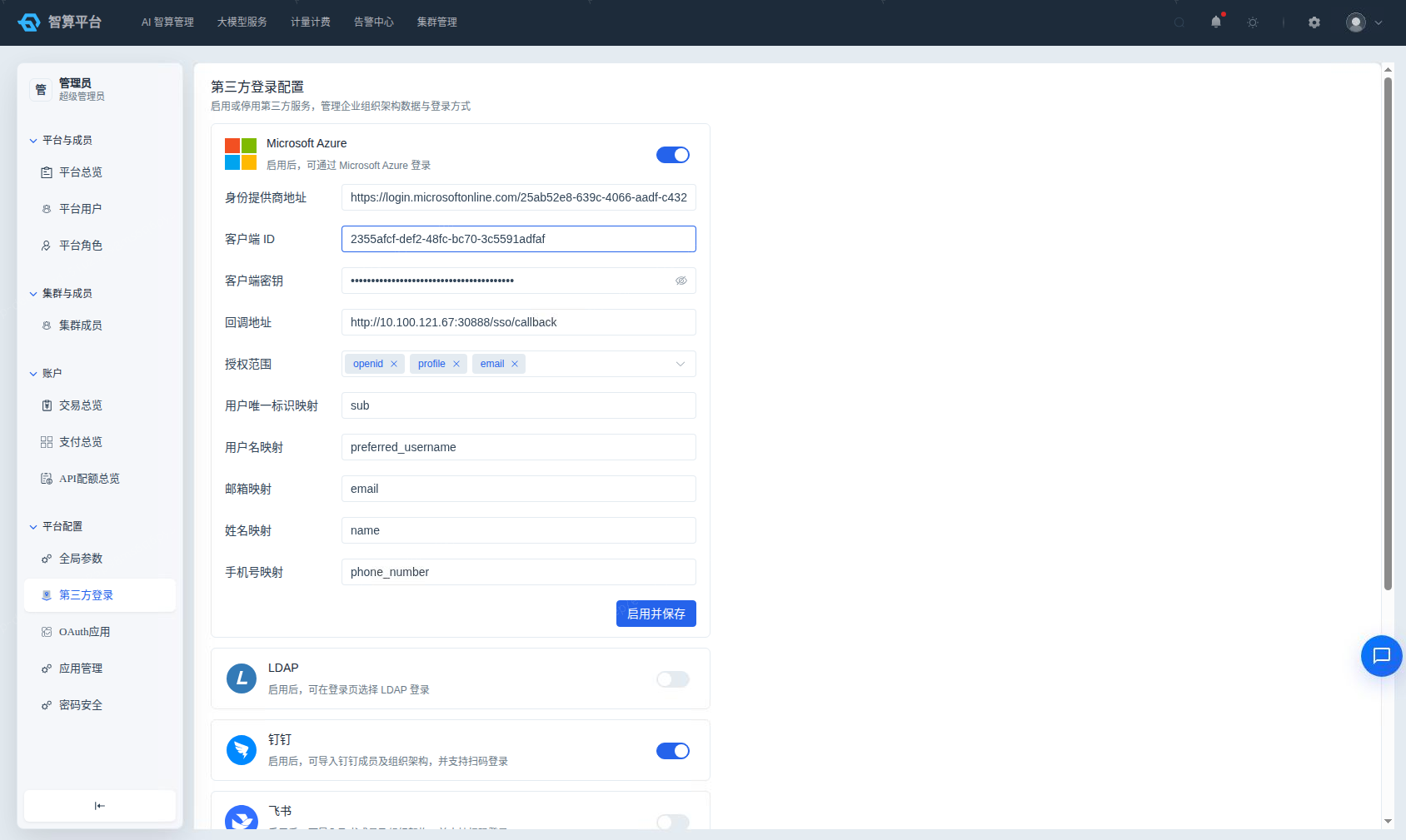
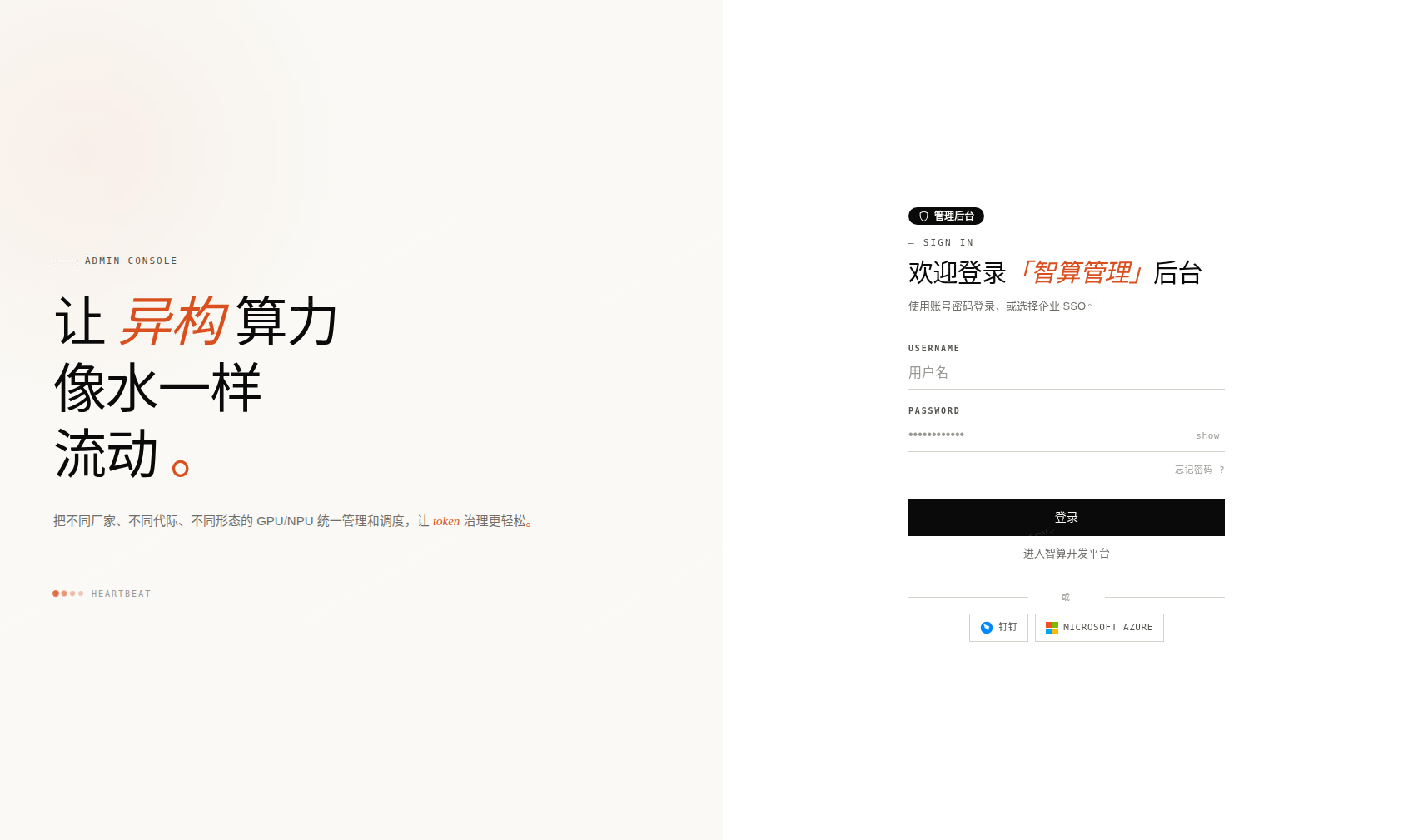
- Find the OIDC login card (labeled "Microsoft Azure") and enable the toggle.
- Fill in:
- Issuer URL: The OIDC Provider's discovery endpoint (e.g.,
https://accounts.google.comorhttps://login.microsoftonline.com/{tenant}/v2.0). The system automatically fetches the Provider configuration. - Client ID: The client ID obtained after registering your application with the OIDC Provider.
- Client Secret: The corresponding client secret.
- Callback URL: The platform callback URL in the format
{platform-address}/camp/auth/callback. This must be registered as an allowed redirect URI in the OIDC Provider. - Scopes (optional): Requested permission scopes. Defaults to
openid,profile,email. Supports multi-select and custom additions.
- Issuer URL: The OIDC Provider's discovery endpoint (e.g.,
- Claim Mapping (optional): Maps ID Token fields from the OIDC Provider to platform user attributes:
- Subject Claim: Unique user identifier. Default:
sub. - Username Claim: Username field. Default:
preferred_username. - Email Claim: Email field. Default:
email. - Name Claim: Display name field. Default:
name. - Mobile Claim: Phone number field. Default:
phone_number.
- Subject Claim: Unique user identifier. Default:
- Click "Test" to verify the configuration, then click "Save".
- After saving, the login page will display an OIDC login button. Users will be redirected to the OIDC Provider for authentication.
Test and Enable
All third-party login configurations must pass the test API verification before enabling; validation failures will display a notification without closing the panel — correct the configuration and save again.
OAuth Applications
View OAuth Applications
- Navigate to Platform Management > Platform Configuration > OAuth Applications.
- The list displays: application name, client ID, client secret (masked and copyable), redirect URL, enabled status.
- Use the top filter bar to search by application name, client ID, redirect URL, and enabled status.
Create OAuth Application
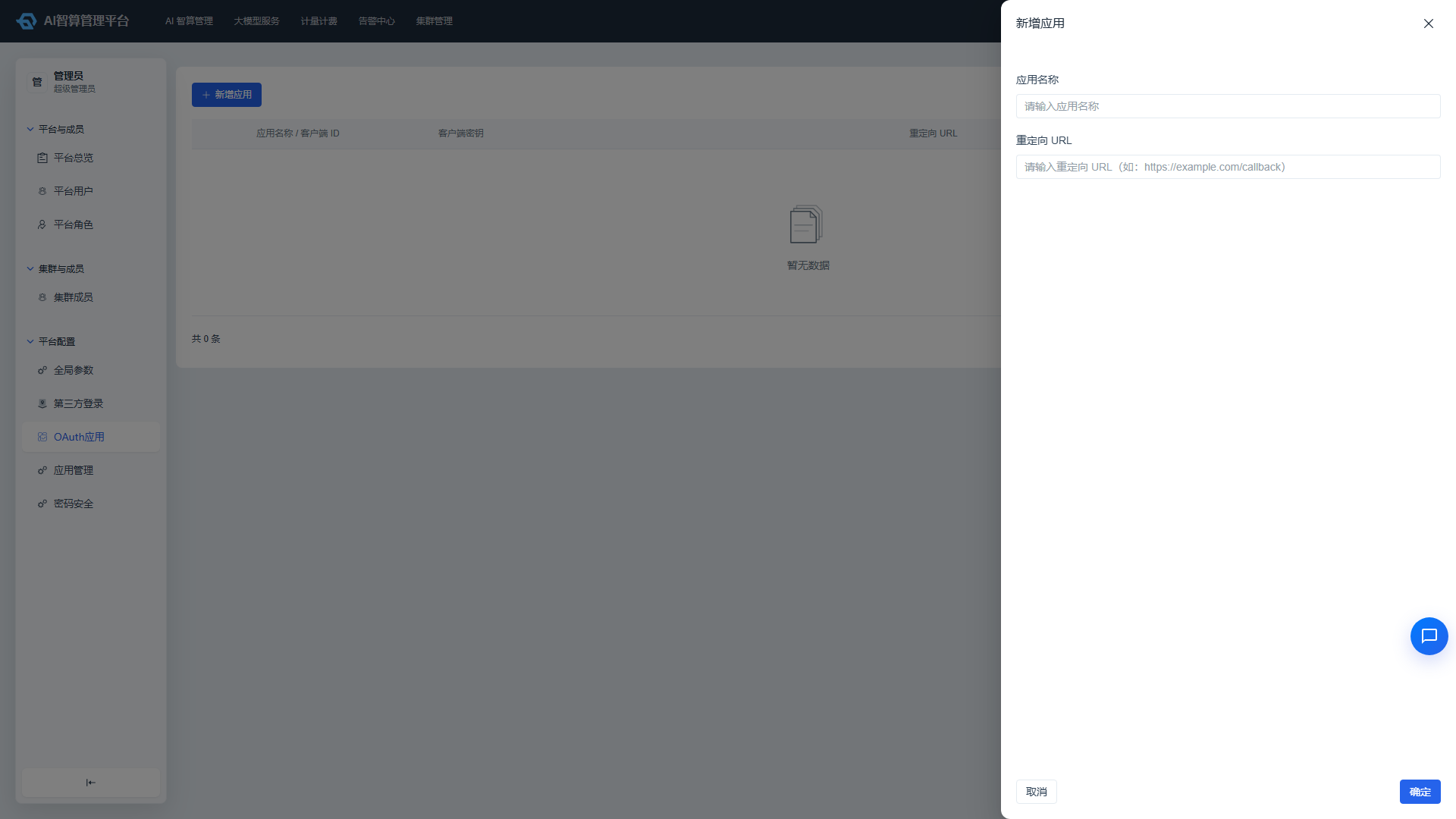
- Click "Create Application".
- Fill in:
- Application Name: A recognizable name.
- Redirect URL: Third-party application callback URL.
- Click "Create"; the system generates a client ID and client secret.
Manage OAuth Applications
- Click "More Actions" in the list row:
- Edit: Modify the application name and redirect URL.
- Reset Secret: Regenerate the client secret; the old secret becomes invalid immediately after reset — update your third-party application accordingly.
- Enable/Disable: Control whether the application can initiate authorization.
- Delete: Delete applications that are no longer in use.
Authorization Code Flow Integration
The platform, acting as an OAuth provider, supports the standard authorization code flow:
- The third-party application directs the user to the
GenerateCodeendpoint to obtain an authorization code. - Use the authorization code to call the
Tokenendpoint to exchange for an access token. - Use the access token to call the
UserInfoendpoint to obtain user information.
Application Management
View Application Plugins
- Navigate to Platform Management > Platform Configuration > Application Management.
- The list is displayed as plugin cards/tables: plugin icon, name, description, package name, module name, installation status.
- Use the top tabs to filter:
- Platform: All / AI Development Platform / AI Management Platform.
- Application Package: Filter by package name.
- Installation Status: Installed / Not Installed.
- Enter a package name, module name, or plugin name in the search box; results will highlight matching keywords.
Install/Uninstall Plugins
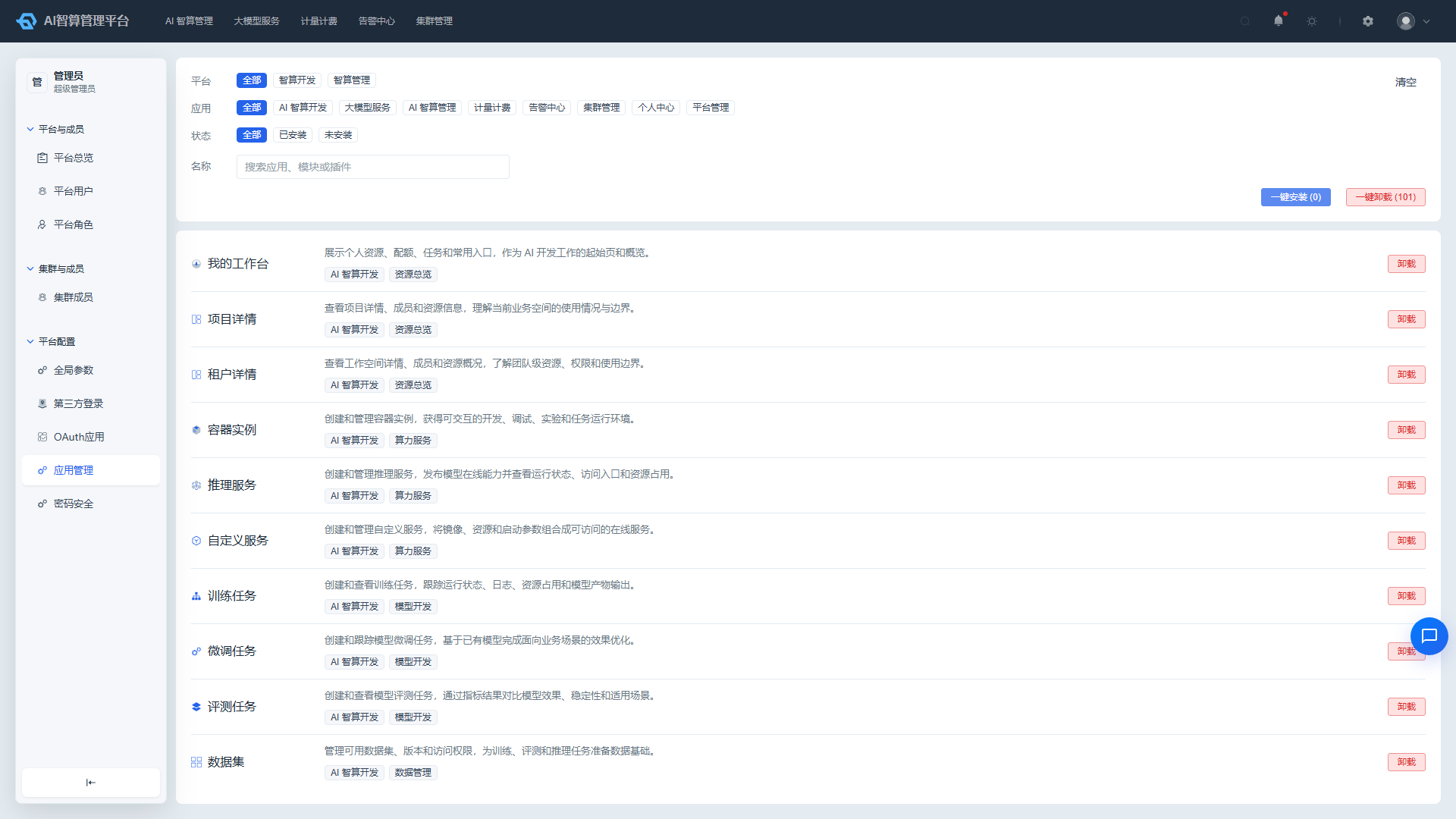
- Single install: Click "Install" in the row of an uninstalled plugin; installation takes effect immediately.
- Single uninstall: Click "Uninstall" in the row of an installed plugin; confirm in the modal to uninstall.
- Bulk install: After filtering, select multiple uninstalled plugins and click "Bulk Install".
- Bulk uninstall: After filtering, select multiple installed plugins and click "Bulk Uninstall".
- System critical plugins are marked as locked and cannot be uninstalled; the button is grayed out with a "System Locked" notification.
Module and Plugin Configuration
- Click a plugin name to enter the details page.
- In the "Module Configuration" or "Plugin Configuration" tab, modify the configuration items.
- Click "Save" to apply.
Password Security
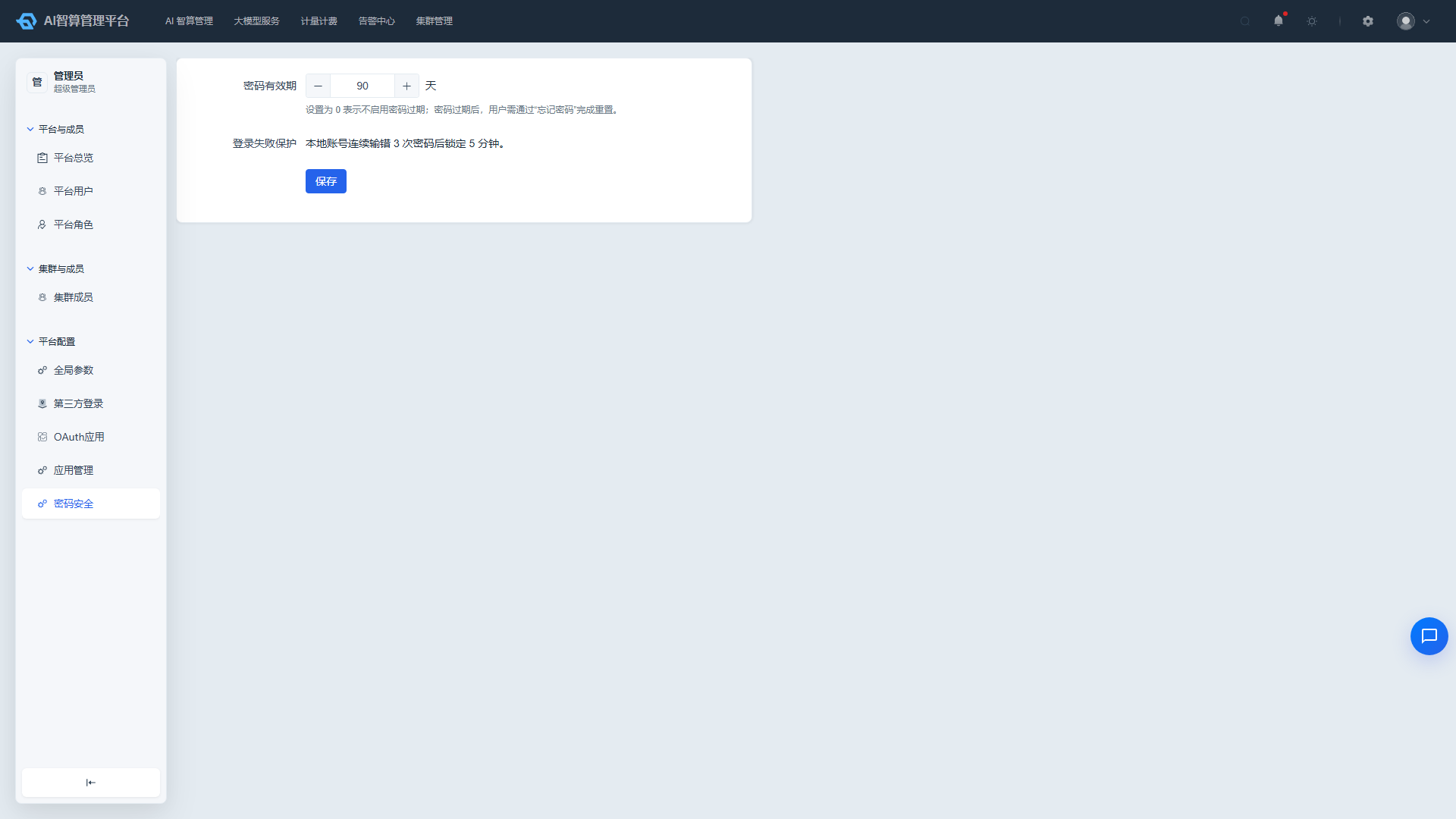
- Navigate to Platform Management > Platform Configuration > Password Security.
- Set the Password Expiration Period (Days) for platform local accounts:
- Setting to 0 disables password expiration.
- Setting to N days means users must reset their password via the forgot password flow after expiration.
- The page displays login protection rules in read-only: local accounts are locked for 5 minutes after 3 consecutive incorrect password attempts.
- The page displays password transmission protection in read-only: the login password of local accounts is encrypted in the browser before transmission and is never exposed in plaintext during transfer.
- Click "Save" to apply.
Navigation Order
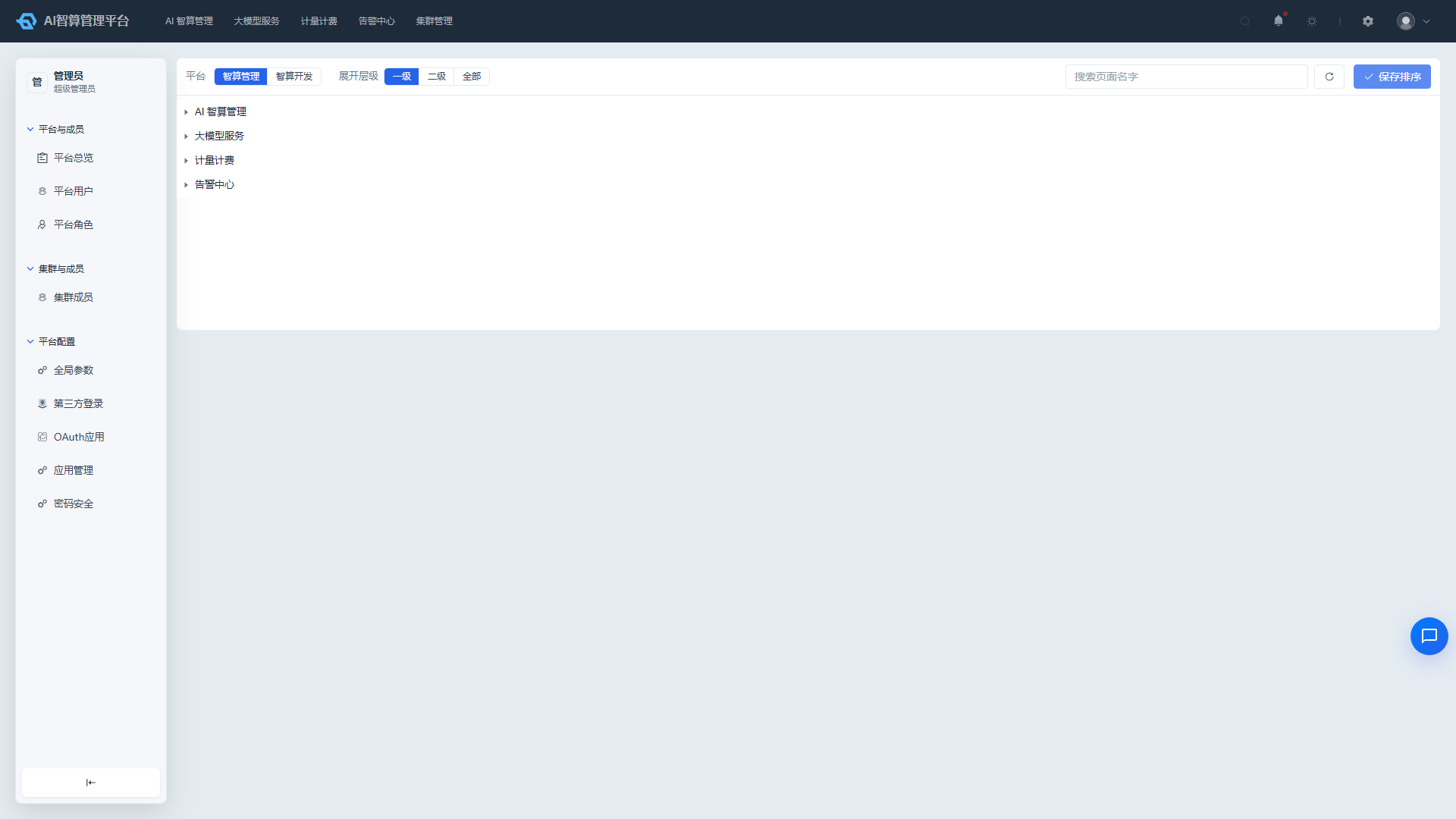
- Navigate to Platform Management > Platform Configuration > Navigation Order.
- Switch between "AI Management Platform" or "AI Development Platform" at the top to configure navigation menu order for each respectively.
- Use the "Level 1 / Level 2 / All" buttons to control the navigation tree expansion granularity.
- Enter a menu name keyword in the search box to quickly locate a node.
- Drag sibling menu nodes to adjust order; cross-level dragging is prohibited.
- Click "Save" to apply after adjustments are complete; click "Refresh" to reload the navigation tree.
FAQ
Q: What is the difference between global parameters and cluster parameters? A: Global parameters apply to all clusters; cluster parameters can be individually overridden for each cluster, suitable for scenarios requiring cluster-specific differentiated configuration.
Q: Third-party login test fails but the configuration looks correct? A: Please check network connectivity between the platform and the third-party service, verify the callback URL is correct, and confirm that the AppKey/AppSecret has not expired.
Q: What if I want to restore an uninstalled application plugin? A: Find the plugin in the Application Management list and click "Install" to re-enable it; system-locked plugins cannot be uninstalled.
Q: Why didn't the navigation order change take effect immediately after saving? A: Please refresh the browser page, or check whether you saved to the correct platform (AI Management Platform / AI Development Platform).