Token Governance
"Token Governance" presents LLM call costs, request volume, Token consumption, and service quality from the user payable perspective. It covers both privately deployed models and external API channel sources, helping platform administrators, operations staff, and tenants quickly identify abnormal consumption, reconcile bills, and configure model unit prices.
Entry path: Left sidebar Billing > Token Governance, page route
/admin/billing/governance.
Page Menu
| Page | Route | Description |
|---|---|---|
| Overview | /admin/billing/governance/overview | Core KPIs, trend charts, consumption spike/drop identification |
| Model Distribution | /admin/billing/governance/models | Aggregated call volume, Tokens, and bills by model |
| Model Call Records | /admin/billing/governance/calls | Individual call details, call tracing, billing breakdown |
| Users & Workspaces | /admin/billing/governance/consumers | Consumption rankings aggregated by user or workspace |
| API Keys | /admin/billing/governance/keys | Key-level usage, enable/disable/lock management |
| API Key Details | /admin/billing/governance/key/:uuid | Individual key trends, model distribution, call logs |
| Model Billing Strategy | /admin/billing/governance/strategy | Configure five-segment unit prices for model input/output/cache, etc. |
Overview: Understand the Consumption Dashboard First
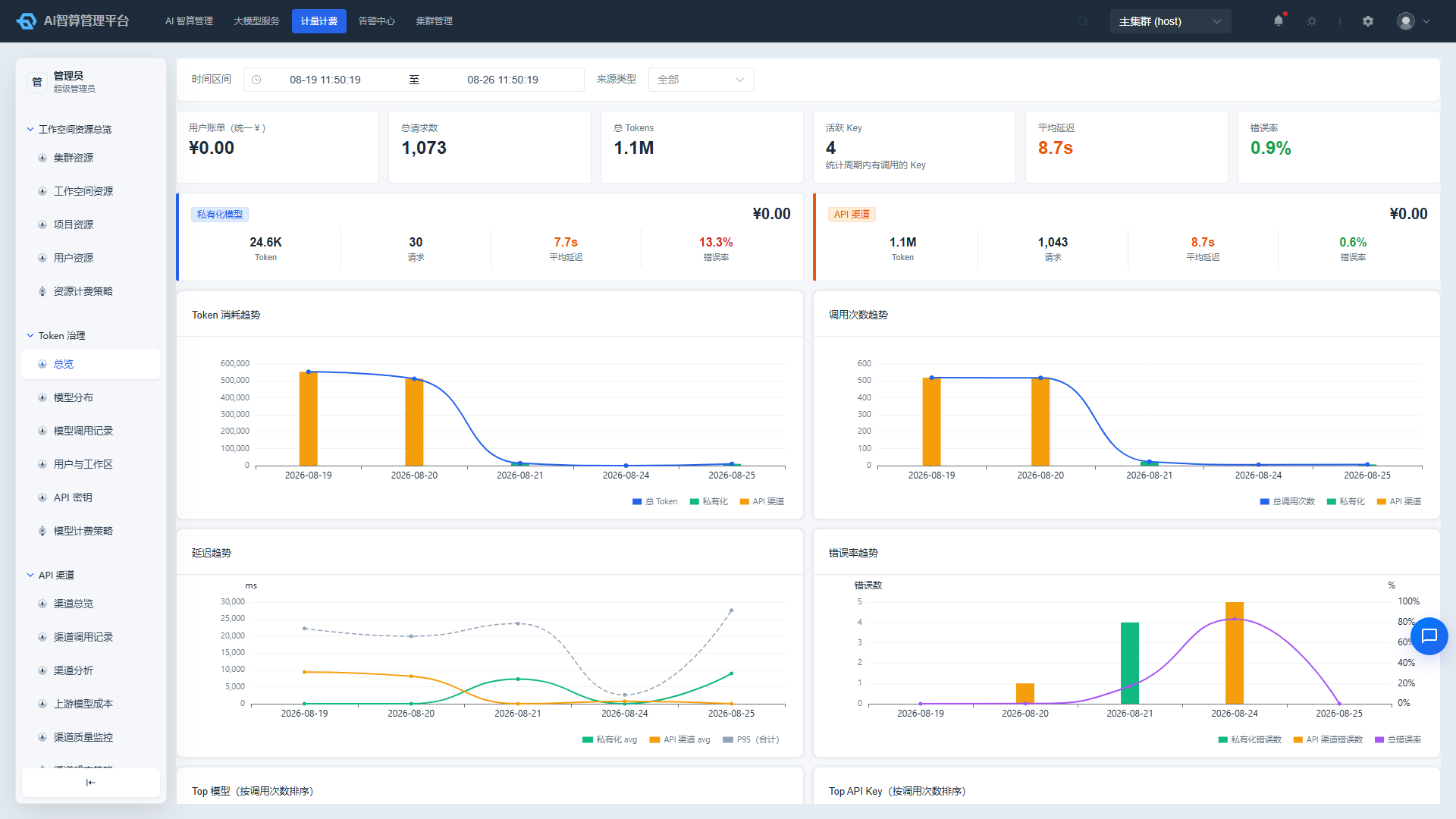
- Navigate to Token Governance > Overview.
- At the top of the page, select a time range (e.g., last 7 days / 30 days) and a Source Type:
- All: Private models + API channels.
- Private Models: Statistics for inference services deployed on this platform only.
- API Channels: Statistics for calls forwarded through external channels only.
- Review the KPI cards:
- Total Cost / Total Requests / Total Tokens / Active API Keys
- Average Latency / Time to First Token / Overall Error Rate: latency cards are displayed side by side; amount and Token values are formatted with thousands separators.
- Review the trend charts: Token consumption, call count, latency (including P95), time to first token (TTFT), and error rate over time; total Tokens and cost are split by input / output / cache.
- Review Top Movers / Droppers:
- Switch dimensions: Model / Channel / API Key.
- Switch periods: Day / Week / Month / Quarter.
- The system sorts by period-over-period increase/decrease, enabling quick identification of objects with sudden consumption spikes or drops.
- Review the Top 8 Model Ranking and API Key Ranking; click to drill down to the corresponding detail page.
It is recommended to review Top Movers each morning. If abnormal consumption is found, navigate to "Model Call Records" to locate specific calls.
Model Distribution: View Usage by Model
- Navigate to Token Governance > Model Distribution.
- Select a time range and source type.
- The page displays:
- Number of models, total Tokens, user bill, average latency.
- "Call Volume Distribution" and "Bill Distribution" dual pie charts.
- Model aggregation table: source type, call model, call count, total Tokens, user bill, average latency, error rate.
- The table supports:
- Clicking column headers to sort.
- Clicking "View" in the row actions to drill down into that model's call records.
- CSV export and column visibility adjustment.
Model Call Records: Reconcile Bills Line by Line
- Navigate to Token Governance > Model Call Records.
- Use the top search area for combined filtering:
- Time range
- Call model / Upstream model (supports manual input)
- API Key
- Username / Workspace
- Status code / Source type
- Token Usage Range: filter by minimum/maximum total Tokens (
0is a valid value).
- Click "Expand/Collapse" to reveal more filter options.
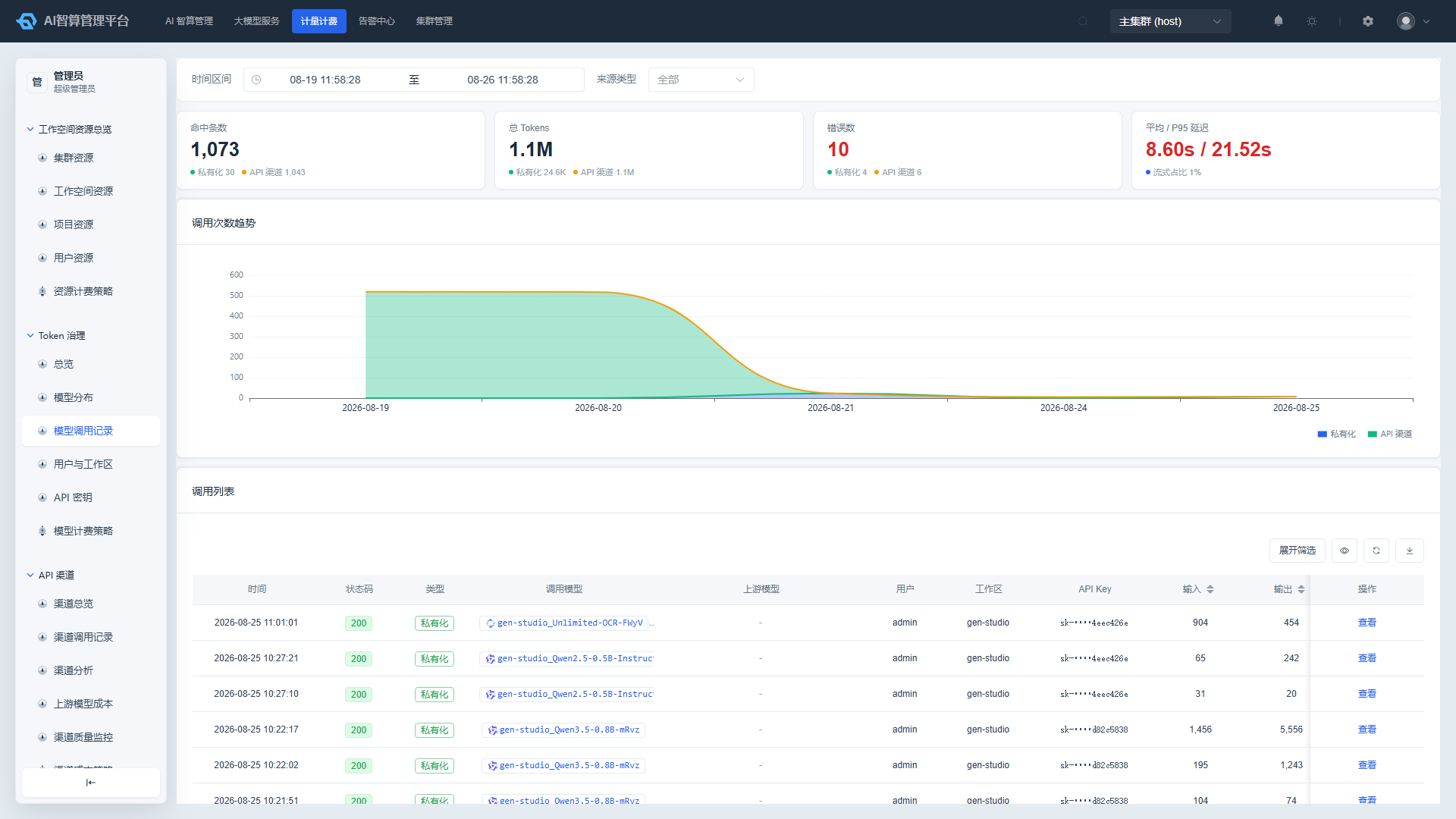
- Above the list, trend charts for the time range are displayed: a cache hit rate trend is drawn alongside the call count trend, plus latency / TTFT trends; the KPI area splits "Average / P95 Latency" into two cards with a "Time to First Token" card beside them.
- The list displays each call's basic information: timestamp, status code, call model, user, workspace, total Tokens, user bill (formatted with thousands separators), total duration, time to first token, etc.
- Click a row or "View" to open the call details drawer:
- Call Trace: Client → Gateway → Upstream → Completion, with failed steps highlighted in red and error categories displayed.
- Basic Information: Request ID, call model, upstream model, source IP, error category, and other key fields are copyable.
- Billing Breakdown: Expand to view Token usage × unit price for input/output/cache/cache write 5m/1h segments, with reconciliation against the bill amount; mismatches are highlighted.
- Token Usage: Input, output, cache, reasoning, and other granular breakdowns.
- Performance Metrics: Total duration, time to first token, time to first byte.
- Input/Output Original Content: Multimodal content is displayed with tag-based counts and can be switched to view the raw content.
If a record's amount displays "Calculating," it indicates the backend has not yet completed pricing processing; genuinely free calls will be explicitly marked.
Users & Workspaces: See Who Spent What
- Navigate to Token Governance > Users & Workspaces.
- Select a time range and source type.
- Click the dimension switch button to aggregate by User or by Workspace.
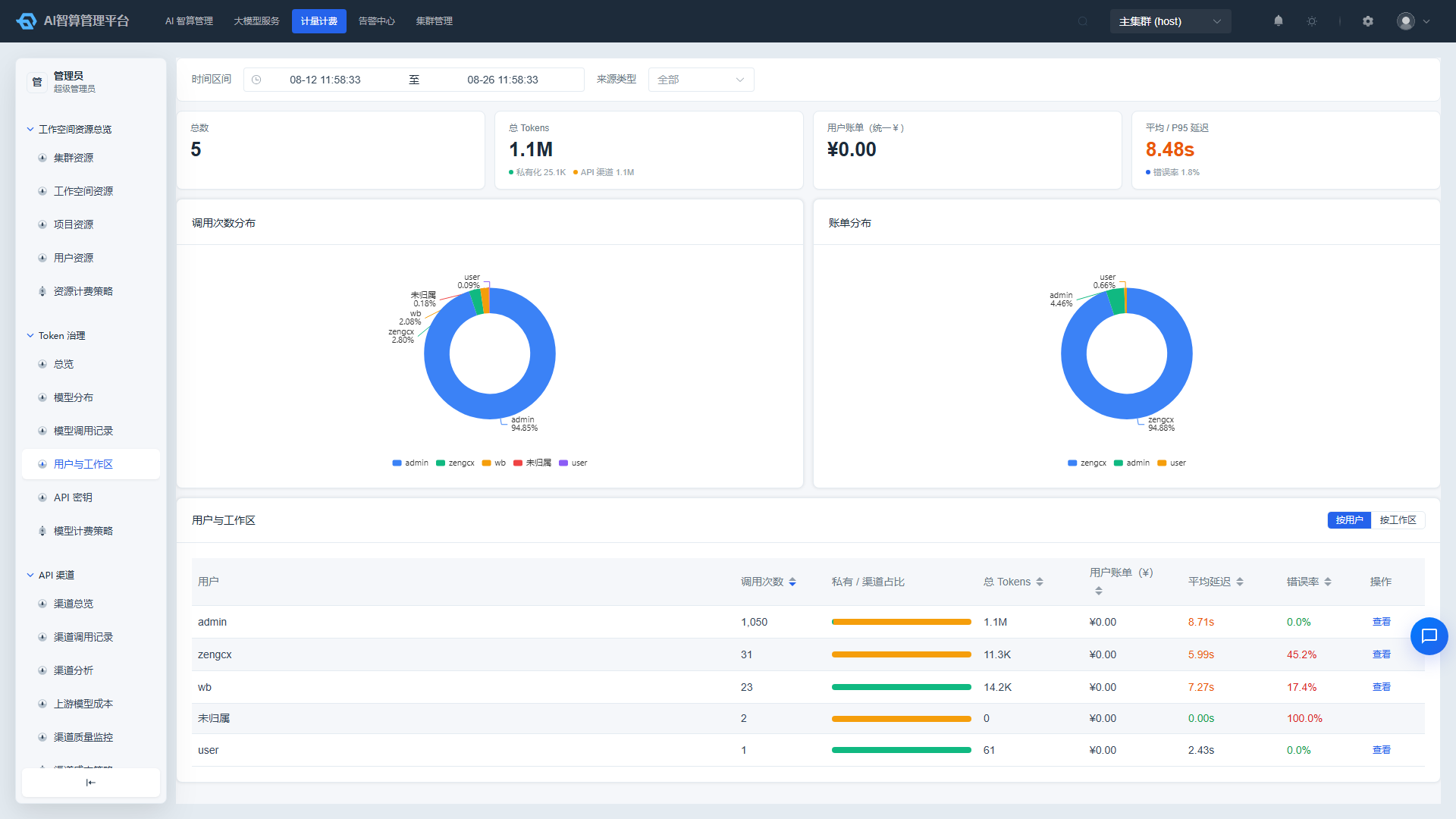
- Review the aggregation table:
- User/Workspace name
- Call count
- Private / API Channel proportion bar chart
- Total Tokens, user bill, average latency, error rate
- Default sorting is by call count descending; clicking column headers is supported for custom sorting.
- Click "View" in the row actions to drill down into that user/workspace's call records.
The "Unassigned" row represents external API channel calls and cannot be drilled down further.
API Keys: Manage Call Credentials
View Key Usage
- Navigate to Token Governance > API Keys.
- Select a time range and source type.
- The table displays each Key's:
- Key name, masked Key value, owner
- Status (Enabled / Disabled / Locked)
- Call count, total Tokens, user bill
- Supports filtering and sorting by status and Key name.
- Click a row to enter the API Key Details page, which shows:
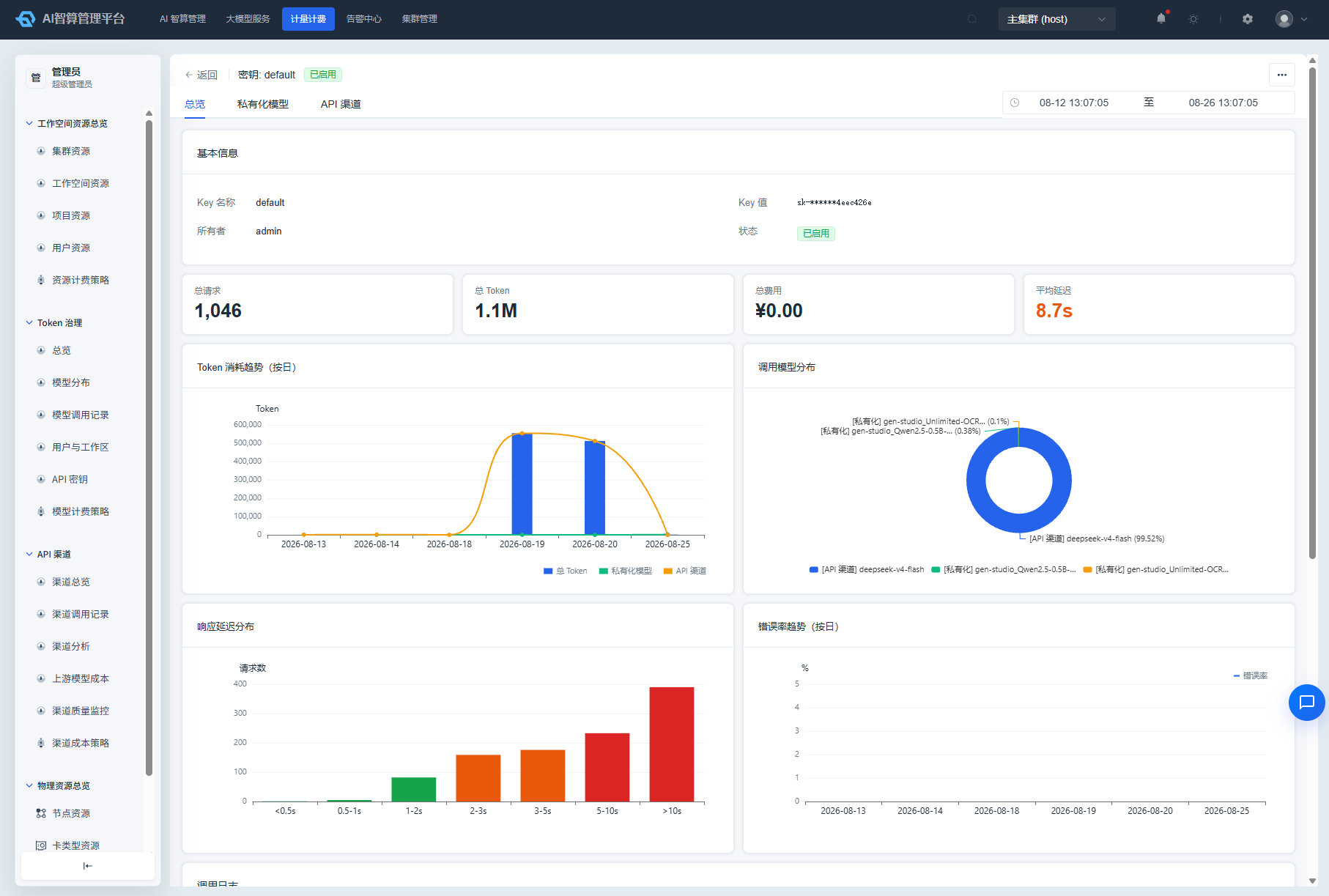
- Token / Cost / Request / Latency statistical cards
- Token trend chart, call model distribution pie chart, response latency distribution, error rate trend
- Call log list
Enable, Disable, and Lock Keys
Click the "More" button in the top-right corner of the API Key details page:
- Enable: Restore the Key's call capability.
- Disable: Suspend the Key's call capability; a disabled Key can be restored by re-enabling it.
- Lock: Lock the Key, typically for security risk control scenarios; a locked Key must be manually enabled to restore.
Status changes take effect immediately. It is recommended to verify whether the Key is still being called by live services before performing any operations.
Model Billing Strategy: Configure Model Unit Prices
Model billing strategy is used to set five-segment unit prices (input/output/cache, etc.) for models published on the platform, serving as the foundation for Token Governance to calculate user bills.
Create a Billing Rule
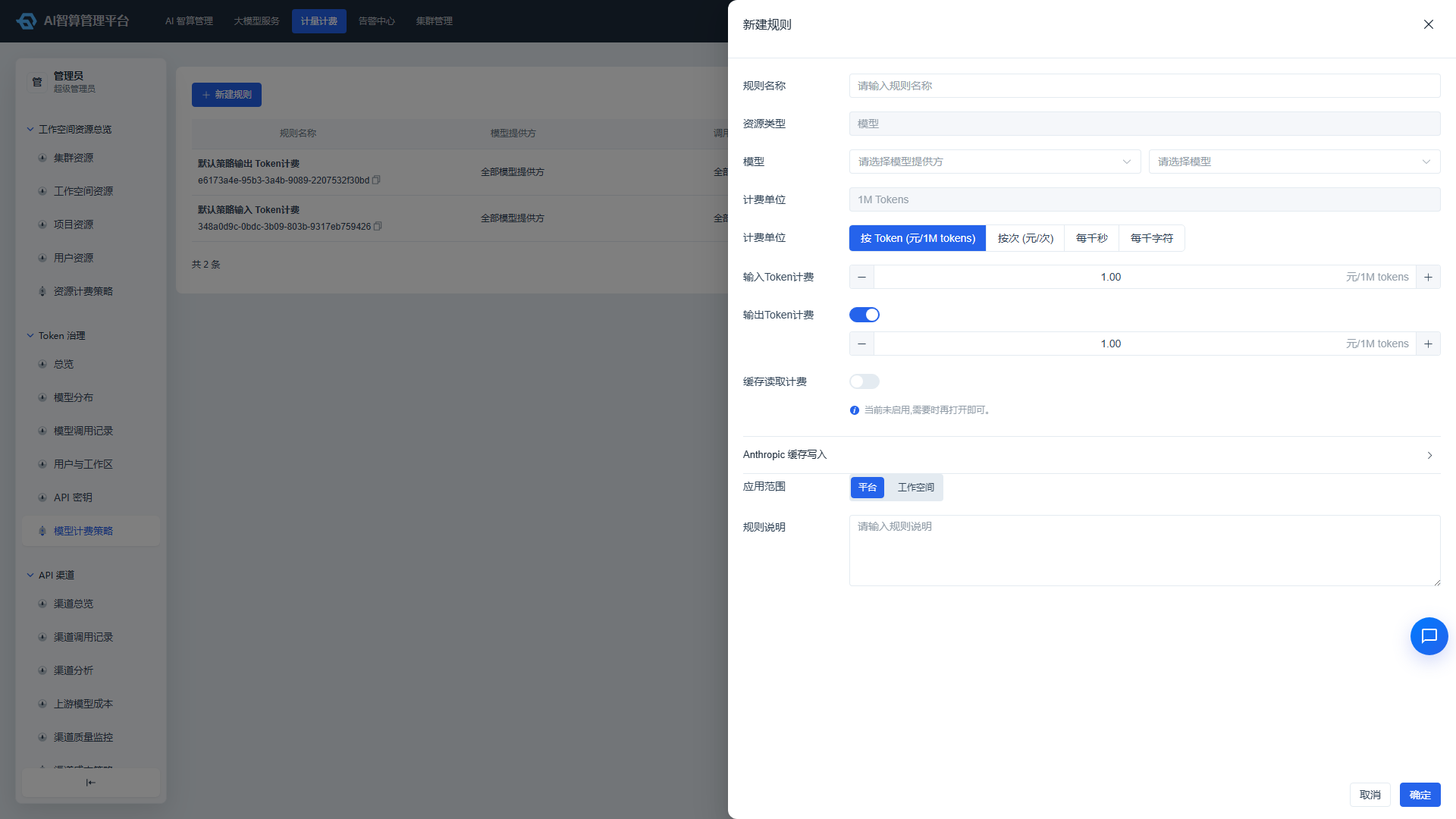
- Navigate to Token Governance > Model Billing Strategy.
- Click "New Rule".
- Enter a Rule Name.
- Select a Model Provider and Call Model:
- Dropdown options are sourced from models that are enabled in the model repository.
- Manual input of provider/model names is supported.
- Selecting "All Providers" + "All Models" can serve as a fallback price.
- Select a Billing Unit:
- Per Token (CNY/1M tokens): Suitable for text-based LLMs.
- Per Call (CNY/call): Suitable for image, audio, video, and other non-text models.
- Per Thousand Seconds / Per Thousand Characters: Suitable for speech and other duration- or character-based billing scenarios.
- Fill in the prices:
- Per Token mode: Input Token unit price is required; output, cache read, and cache write 5-minute/1-hour prices can be enabled via toggles.
- Per Call / Per Thousand Seconds / Per Thousand Characters mode: Enter a single unit price.
- Tiered Price Table (Per Call mode only): Set different tiered prices based on model protocol parameters; tier names must not be duplicated.
- Select the Application Scope:
- Platform-wide: Applies to the entire platform.
- Workspace-level: Select a specific workspace; applies only to that workspace.
- Enter a Rule Description for future audit purposes.
- Click "Confirm" to save.
It is recommended to configure at least one fallback rule with "All Providers + All Models" to prevent billing gaps when new models are added without pricing.
Edit, Delete, and View Revision History
- Locate the target rule in the rule list.
- Row actions:
- Edit: Modify the rule name, price, and description; model and application scope cannot be changed after creation — create a new rule if adjustments are needed.
- Delete: Requires confirmation before deletion.
- Revision History: View historical price changes for that rule, including operator, operation type, price change magnitude, and notes.
- The list supports filtering by rule name, application scope, and provider/model.
Billing Priority (User Payable)
When a single call matches multiple rules, the platform matches according to the following priority (more specific rules take precedence):
1. provider + workspace + model
2. provider + workspace + "*"
3. provider + model
4. provider + "*"
5. workspace + model
6. system + model
7. base fallback
* serves as a wildcard. When configuring strategies, you can use wildcard rules to set base prices and then override them with specific model rules.
FAQ
Q: Why do some costs in the overview show as 0? A: The call may not have a billing strategy configured, may still be "Calculating," or may have been explicitly set to a 0 unit price by a strategy.
Q: How do I verify that user bills are calculated correctly? A: Open the details drawer in "Model Call Records," expand the billing breakdown, and verify Token usage × unit price against the bill amount segment by segment.
Q: Why are API channel source calls not shown in Token Governance? A: Token Governance defaults to the user payable perspective. For API channel costs (platform procurement costs), navigate to Billing > API Channel.
Q: How do I fill in tier names for per-call billing? A: Tier names must exactly match the parameters in the model protocol and only apply to asynchronous generation routes; refer to the protocol documentation for the specific image/video generation or speech model.
Q: What is the maximum time range I can select? A: The time range selector on the Token Governance page is linked to KPI cards and charts; the maximum range may be subject to product limitations (e.g., 60 days). Refer to the page prompt for specifics.