My Calls & Usage
"My Call Records" and "My Usage" are two personal-perspective pages under the ModelX Service: the former provides per-call details, while the latter offers aggregated statistics and trends. Both pages only display call data for the currently logged-in account.
My Call Records
Access path: Left sidebar ModelX Service > Model Marketplace > My Call Records, page route
/admin/model-x/my-calls.
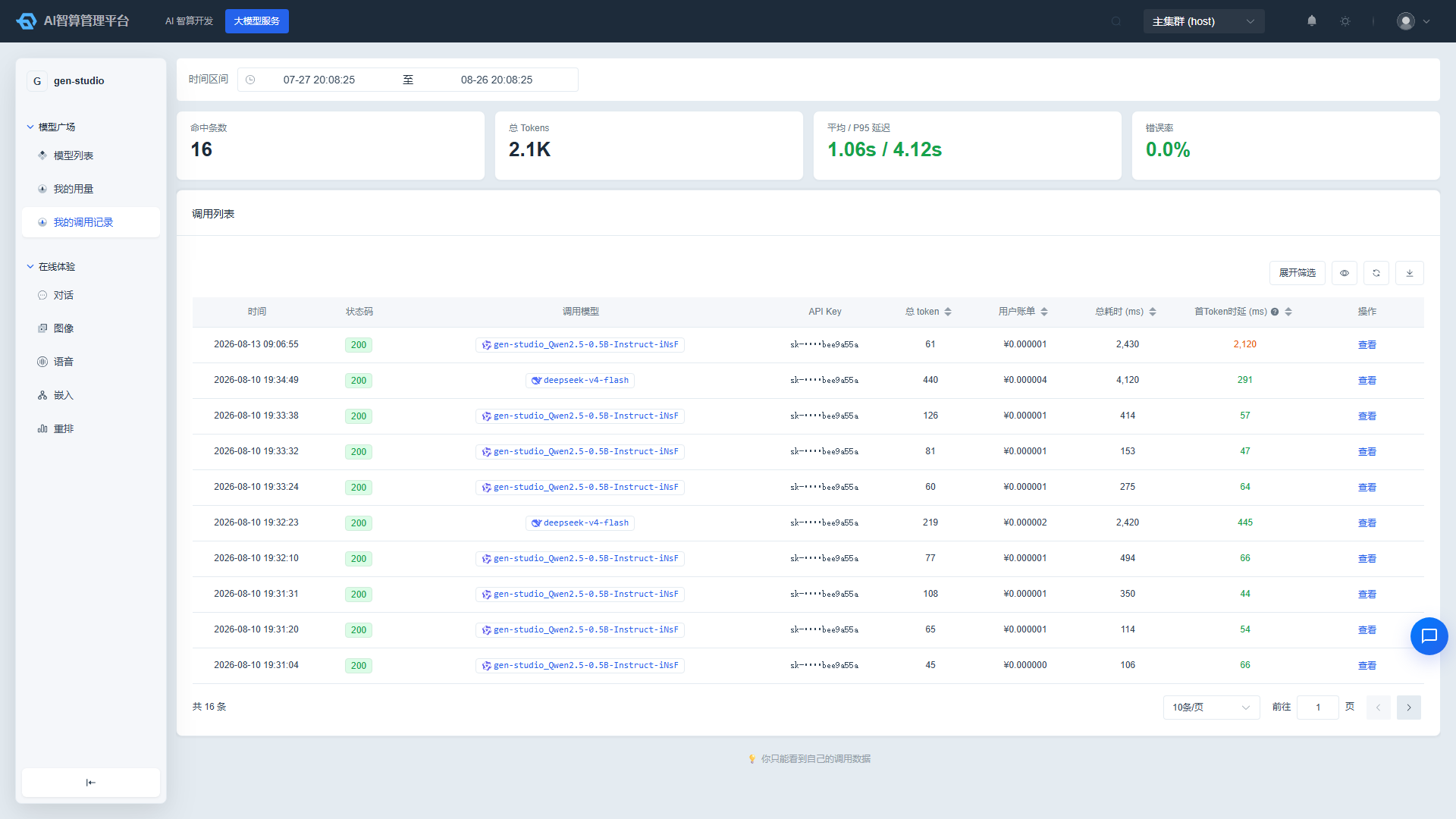
Statistical Overview
At the top of the page, 4 KPI cards are displayed for the selected time range (default: last 30 days; clicking refresh pushes the upper bound to the current time):
- Matched calls: Number of call records matching the filter criteria.
- Total Tokens: Total token count, abbreviated when exceeding 1K / 1M.
- Average / P95 latency: Based on total duration, in seconds.
- Error rate: Color-coded by threshold; displays
—when there are no calls.
Querying Call Details
- Select the time range in the toolbar.
- Click "Expand Filters" to apply a combination of the following conditions:
- Model: Dropdown selection.
- API Key: Enter a username or the last 8 characters of a key.
- Status code: e.g.,
200,404,500.
- List columns: Time, status code (color-coded for 2xx / 4xx / 5xx;
0indicates interrupted / other), called model, API key (masked), total tokens, user bill (displays-when billing is not yet completed), total duration (ms), first token latency (ms, only populated for streaming calls). - The total tokens, user bill, total duration, and first token latency columns support click-to-sort.
Viewing Call Details
Click a list row or the "View" action on a row to open the call detail drawer:
- Caller info: Workspace, user, API key.
- Call timeline: Duration of each processing step; failed steps are highlighted.
- Basic info: Request ID, status code, source IP, streaming flag, request path, error type, and more.
- Cost: User bill amount; expand to view the pricing breakdown (unit price × usage).
- Token usage and performance: Input / output token counts, TTFT, total duration, and more.
Export
Click "Export" in the toolbar to download a CSV file (filename my-call-logs-<date>) containing the current filtered results.
My Usage
Access path: Left sidebar ModelX Service > Model Marketplace > My Usage, page route
/admin/model-x/my-usage.
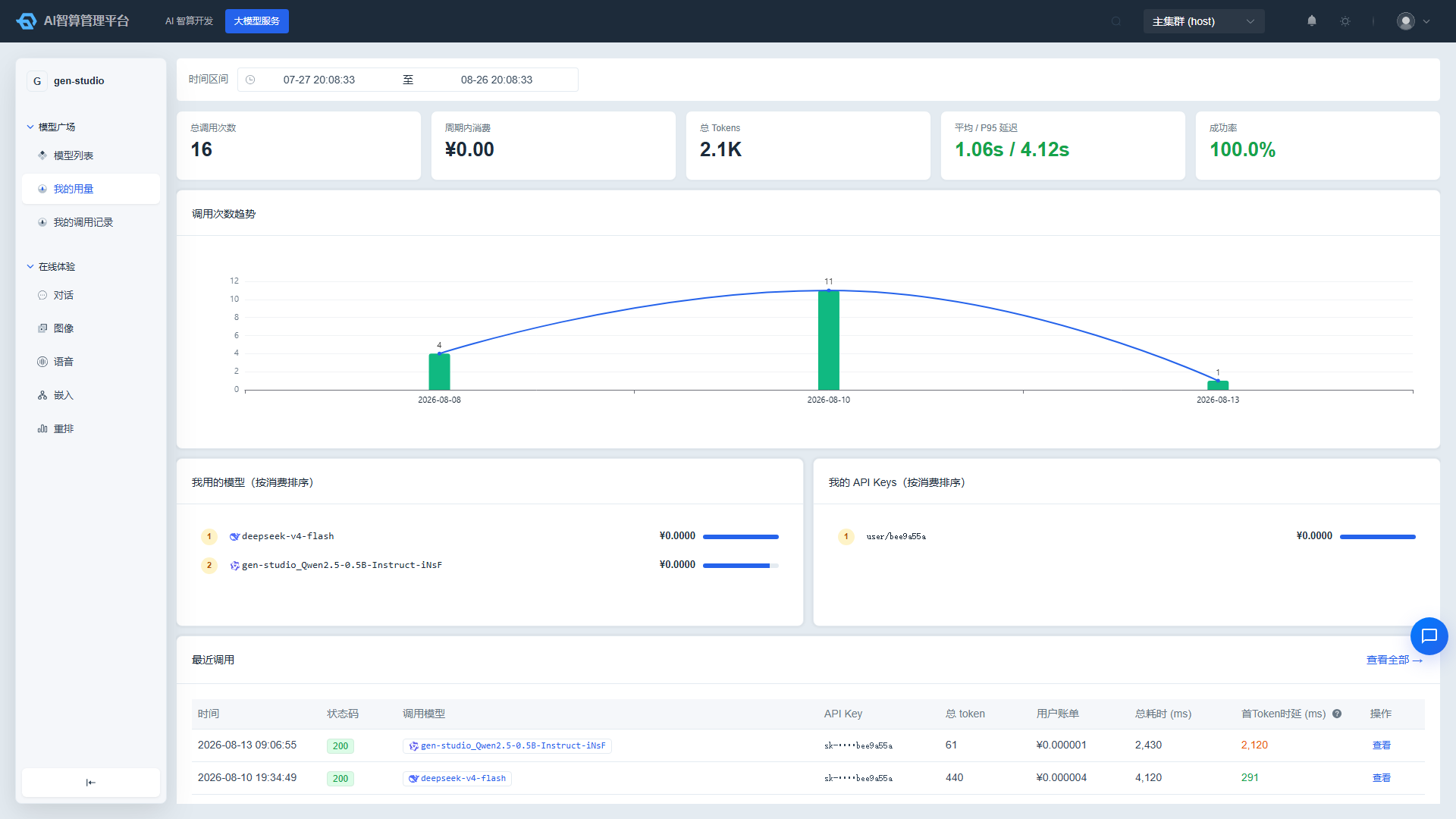
Statistical Cards and Trends
Displayed for the selected time range (default: last 30 days):
- KPI cards: Total call count, period consumption (¥), total tokens, average / P95 latency, success rate. Latency and success rate display
—when there are no calls.- Total Tokens breakdown: the total Tokens KPI also shows input / output split usage above it, along with the cache hit rate, consistent with the Token Governance overview.
- Call count trend chart: Bar + line overlay, with bucket granularity adapting to the time range (minutes / hours for short ranges, days for long ranges).
Consumption Ranking and Drill-Down
- Models I Used and My API Keys: Top 5 rankings sorted by consumption amount, with proportion bars.
- Clicking any row in the ranking automatically navigates to "My Call Records" with the corresponding model / key filter and current time window applied, making it easy to verify details.
Recent Calls
The bottom of the page displays the 5 most recent call records inline. Click a row to open the same detail drawer as in "My Call Records." Click "View All →" in the upper-right corner to navigate to the full list.
FAQ
Q: Why can't I see my colleague's call data? A: These two pages are fixed to display only the currently logged-in account's data, with a persistent notice at the bottom of the page. To view workspace / global usage, use the admin console's Billing module.
Q: What does - in the user bill column mean? A: It indicates that the call has not yet completed pricing. Wait a moment and refresh to see the amount.
Q: Why is the first token latency empty? A: First token latency (TTFT) is only populated for streaming calls. Non-streaming calls display -.
Q: The amounts in the rankings don't match the bills in my call records. A: Please confirm that both pages are set to the same time range. The ranking page amounts are displayed to 4 decimal places, while the call records page uses 6 decimal places — this is a display precision difference.